Pick Your Codec, Pick Your Future: A Plain-English Guide to Video Formats That Will Actually Last
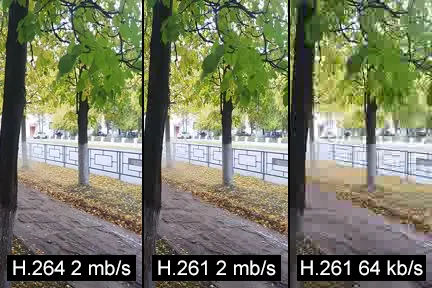
Photo: Emil Dalalyan, CC0, via Wikimedia Commons
Here's a scenario that plays out more often than you'd think: a creator spends years building a video archive, then opens a folder of files one day and realizes half of them won't play properly anymore. The codec is outdated, the software to decode it is no longer supported, and converting everything is going to take a weekend they don't have.
Codec choices feel technical and abstract right up until they become a very concrete problem. If you're archiving video content — your own productions, downloaded footage for research, client deliverables, anything you want to actually access in five or ten years — the format you choose now matters a lot more than most people realize.
So let's cut through the jargon and figure out which codecs are actually worth using in 2025.
Why Codecs Matter for Archiving (Quick Version)
A codec is essentially the algorithm that compresses and decompresses video data. Different codecs make different trade-offs between file size, visual quality, processing demands, and compatibility. For everyday streaming, this stuff happens invisibly in the background. For archiving, you're making a decision that affects how accessible your files are years from now.
The worst-case scenario is a proprietary or niche codec that loses support — suddenly you need specific, possibly discontinued software just to open your own files. The best-case scenario is a widely adopted, open format that plays on basically anything and degrades gracefully as technology evolves.
H.264: The Boring Choice That's Also Kind of Perfect
H.264 (also called AVC) has been around since the mid-2000s, and at this point it's about as universal as video gets. Every browser, every device, every editing platform, every media player — if it plays video at all, it plays H.264.
For archiving, that ubiquity is genuinely valuable. You're not betting on a format that might lose support; H.264 is baked into hardware decoders across basically every device manufactured in the last fifteen years.
The downside is efficiency. H.264 produces larger files than newer codecs at equivalent quality levels. If you're storing thousands of hours of footage, that extra storage overhead adds up fast. It's also not ideal for very high resolution content — 4K in H.264 is manageable but not elegant.
Best for: Social media clips, short-form content, any archive where maximum compatibility matters more than storage efficiency. If you're not sure what format to use and you just want something that will definitely work everywhere forever, H.264 in an MP4 container is a completely defensible choice.
H.265: Better Compression, Messier Compatibility
H.265 (HEVC) offers roughly double the compression efficiency of H.264 at the same quality level — meaning your files can be about half the size without visible quality loss. For large archives, that's a significant practical advantage.
The catch is licensing. H.265 is encumbered by a complicated patent licensing structure involving multiple different patent pools, which has created real inconsistency in how broadly it's supported. Some platforms and devices handle it natively; others require additional codec packs or simply won't play H.265 files at all.
Apple devices handle H.265 well. Windows 10 and 11 require a codec purchase for native playback in some apps (though VLC handles it fine for free). Android support is solid on newer hardware but patchy on older devices.
Best for: 4K and high-resolution archiving where storage costs are a real concern and you're confident in your playback environment. Not ideal if you need files to be universally shareable without any setup on the recipient's end.
VP9: The Open Alternative That Google Built
VP9 was developed by Google as a royalty-free alternative to H.265, and it's the codec that powers most YouTube content at 1080p and above. Compression efficiency is broadly comparable to H.265, and because it's open-source, support has been fairly consistent across browsers and platforms.
The main limitation for archiving is hardware decode support. VP9 doesn't have as deep hardware acceleration support as H.264 or H.265, which means older machines may struggle with high-resolution VP9 files — the CPU has to do more work, playback can stutter, and battery life takes a hit on laptops.
For desktop archiving where you're playing files on reasonably modern hardware, this is largely a non-issue. For long-term preservation where you want files to be playable on whatever hardware exists in 2035? The picture is less clear.
Best for: YouTube-sourced content archives, web-oriented video libraries, scenarios where open licensing matters and you're comfortable with a modern hardware baseline.
AV1: The Future Format That's Almost Ready
AV1 is the codec that everyone in the industry is betting on for the long term. It's open-source, royalty-free, and delivers compression efficiency that's meaningfully better than both H.265 and VP9 — roughly 30-50% better than H.265 in practical terms, depending on the content.
The problem in 2025 is that AV1 is still maturing. Encoding is slow — significantly slower than H.264 or H.265, even on powerful hardware, though dedicated hardware encoders (like those in newer Intel and AMD chips) have improved this substantially. Playback support has expanded rapidly, with most modern browsers, streaming platforms, and newer devices handling AV1 natively. But older hardware is largely out of luck.
For fresh archiving of new content on modern equipment, AV1 is increasingly compelling. For converting an existing library, the encoding time investment is real and worth factoring in.
Best for: Long-term preservation of new content on modern hardware, large libraries where storage efficiency is the top priority, and archivists who are comfortable with slightly longer encoding times in exchange for future-proofing.
Practical Recommendations by Use Case
Short-form social clips (under 10 minutes, lots of them): H.264 in MP4. Compatibility wins here. These files aren't huge anyway, and you want to be able to open them on anything without thinking about it.
Long-form documentary or interview footage: H.265 or AV1. The storage savings are meaningful at scale, and you're likely playing these on controlled hardware where compatibility is predictable.
Research and reference archives (downloaded content from multiple sources): Whatever format the source content came in, if possible. Reencoding always involves quality loss. Preserve originals in their native codec and convert only when necessary.
4K and above original production footage: AV1 if your encoding pipeline supports it; H.265 as a solid fallback. The compression efficiency at high resolutions makes a real difference in storage costs over time.
Client deliverables you're archiving for your own records: H.264. Clients may need to open these files years later on equipment you can't predict. Compatibility is the right call.
One More Thing: The Container Question
The codec is what compresses the video; the container is the file format that wraps it (MP4, MKV, MOV, WebM, etc.). For archiving, MKV (Matroska) deserves a mention because it's open-source, handles virtually any codec, and is more robust for long-term preservation than proprietary containers like MOV. MP4 is fine for most use cases and more universally compatible. Avoid format-locking yourself into containers tied to specific platforms or software ecosystems.
The Bottom Line
There's no single perfect answer, but there is a practical framework: H.264 for maximum compatibility, H.265 for storage efficiency with modern hardware, AV1 for long-term future-proofing if your workflow supports it. Avoid obscure or proprietary formats, keep original files wherever possible, and document what codecs you're using so future-you isn't left guessing.
Your archive is only as useful as it is accessible. Choose formats that work with the future, not against it.